Images
Barcode Types Explained: Which Barcode Format Should You Use?
Code 128, EAN-13, UPC, Code 39, ITF-14: here's what each barcode format is for, what it can hold, and how to make one for free. Plus when you need official GS1 numbers instead of making up your own.
- By Fayaz Ali
- 5 min read
Barcodes look alike, but there are dozens of formats, and a scanner set up for one may ignore another. Picking the right one depends on a single question: is the barcode for your own use, like stock in your shop or files in your office, or for selling through other stores?
The short answer
- Labelling your own stock, files, assets or tickets? Use Code 128. It holds letters and numbers, it's compact, and almost every scanner reads it.
- Selling products through supermarkets or big online marketplaces? You need an EAN-13 (or UPC-A in the US and Canada) with a number officially assigned to your company by GS1. More on that below.
- Labelling shipping cartons? ITF-14 is the standard for outer boxes.
The formats, one by one
All of these can be made with the free Barcode Generator. Pick the format, type the value and download a PNG.
Code 128
The all-rounder. It can encode letters, digits, spaces and punctuation, and packs them tightly, so the barcode stays short even for longer values.
- Holds: any standard keyboard characters (A–Z, a–z, 0–9 and symbols)
- Good for: inventory, warehouse bins, asset tags, library books, event tickets, internal order numbers
- Example: SKU-2041-BLUE
If you're not sure which format to use for internal labels, use this one.
Code 39
An older format that's still common in manufacturing, the automotive industry and some government and defence systems.
- Holds: capital letters A–Z, digits 0–9, spaces and a few symbols (- . $ / + %). There are no lowercase letters: the generator turns them into capitals.
- Good for: systems that specifically require Code 39
- Downside: much wider than Code 128 for the same text
Unless a system asks for Code 39, Code 128 is the better choice.
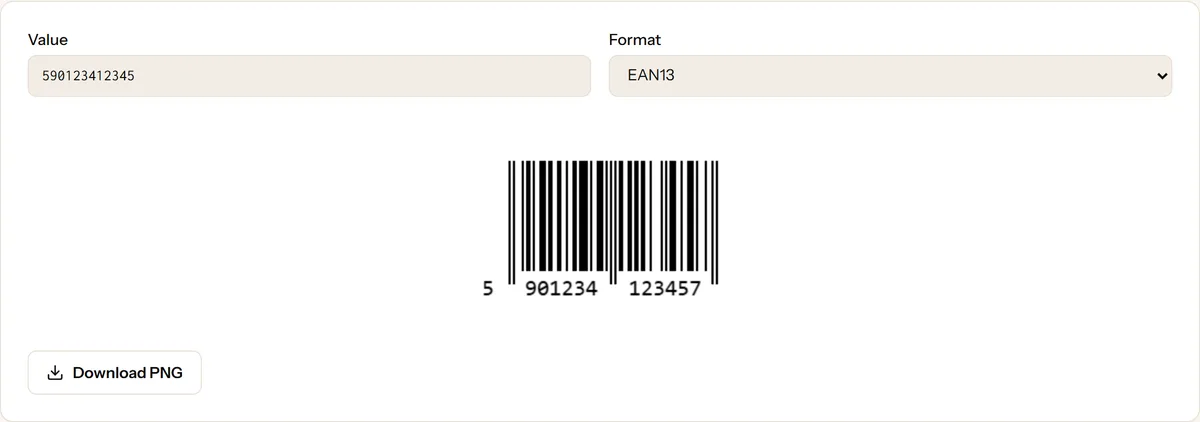
EAN-13
The barcode on most retail products worldwide.
- Holds: exactly 13 digits. Enter the first 12 and the generator calculates the 13th, a check digit that lets scanners catch misreads. If you enter all 13, the last one must be the correct check digit.
- Good for: products sold in shops, supermarkets and on marketplaces
EAN-8
A short version of EAN-13 for very small packages, such as chewing gum or cosmetics, where a full barcode won't fit.
- Holds: 8 digits (enter 7 and the check digit is added)
UPC-A
The North American equivalent of EAN-13, used on retail products in the US and Canada.
- Holds: 12 digits (enter 11 and the check digit is added)
Most scanners outside North America read UPC-A too.
ITF-14
Used on cardboard shipping cartons that hold several retail units. It prints well even on rough, brown cardboard.
- Holds: 14 digits (enter 13 and the check digit is added)
MSI and Pharmacode
Specialist formats. MSI (digits only) is used for shelf labels in some warehouses and older retail systems. Pharmacode is used in pharmaceutical packaging to check that the right packaging is used on production lines. It holds a number between 3 and 131,070 and is not meant to be read by ordinary barcode scanners. Use these only if your system asks for them.
Do you need official barcode numbers?
For your own use, no. If the barcode only needs to be read by your own scanner and your own software, you can number things however you like. Code 128 with your own SKU codes is perfect.
For selling through other retailers, yes. Supermarkets, chain stores and large marketplaces look up EAN and UPC numbers in a global database. Each number must be unique worldwide and registered to your company. These numbers are issued by GS1, the non-profit that runs the system, through a national office (in Pakistan, GS1 Pakistan). You pay a membership fee and receive a range of numbers for your products.
A barcode generator, ours included, only draws the barcode. It can't give you a registered number. Making up an EAN number for retail risks clashing with another company's product and being rejected by stores.
How to print barcodes that scan
- Black bars on a white background. Scanners read the contrast between bars and spaces. Avoid red bars entirely: many scanners use red light, which makes red bars invisible.
- Don't squash the width. Shrinking a barcode sideways makes the thinnest bars too thin for the scanner. If it doesn't fit, make the whole thing bigger rather than squeezing it.
- Keep the margins. The white space on both sides, called the quiet zone, tells the scanner where the barcode starts and ends. Don't let text, borders or the edge of the label touch the bars.
- Print sharply. Use a decent printer and a smooth label. Smudged or blurred bars are the most common reason a barcode won't scan.
- Test before printing hundreds. Scan a sample with your real scanner, or check a photo of it with the Barcode Reader, which decodes a barcode from an uploaded image.
Barcode or QR code?
A barcode stores a short code, usually a number that your system looks up. A QR code can hold much more, such as a full web address, and phone cameras read it without any extra app. For product shelves and stock, use barcodes. For anything customers will scan with their phone, a QR code is the better choice.
Quick answers
Is the Barcode Generator free for commercial use? Yes, with no watermark and no limits. Files are generated in your browser.
Why does my EAN-13 show an error? EAN-13 accepts digits only, and exactly 12 or 13 of them. If you enter 13, the last digit must be the correct check digit. Enter just the first 12 and the generator adds it for you.
Why does Code 39 reject my text? Code 39 supports only capital letters, digits, spaces and the symbols - . $ / + %. Characters such as _ @ or # aren't allowed. Switch to Code 128, which accepts them.
What file format do I get? A PNG image, ready to place on a label or in a document.
Keep reading
More on Images
- Images
How QR Codes Work and Why Some Won't Scan
QR codes look like noise, but every square has a job, including repairing damage. Learn how they work and how to fix a code that won't scan.
6 min read
- Images
JPG vs PNG vs WebP: Which Image Format to Use
JPG, PNG or WebP? A practical guide to what each format does best, with simple rules for photos, logos, screenshots and website images.
5 min read