Design
How to Convert RGB to HEX: Step-by-Step Guide with Examples
Learn how to convert RGB to HEX manually with simple steps, a verified example, and tips to avoid leading-zero mistakes and check your color codes.
- By Fayaz Ali
- 6 min read
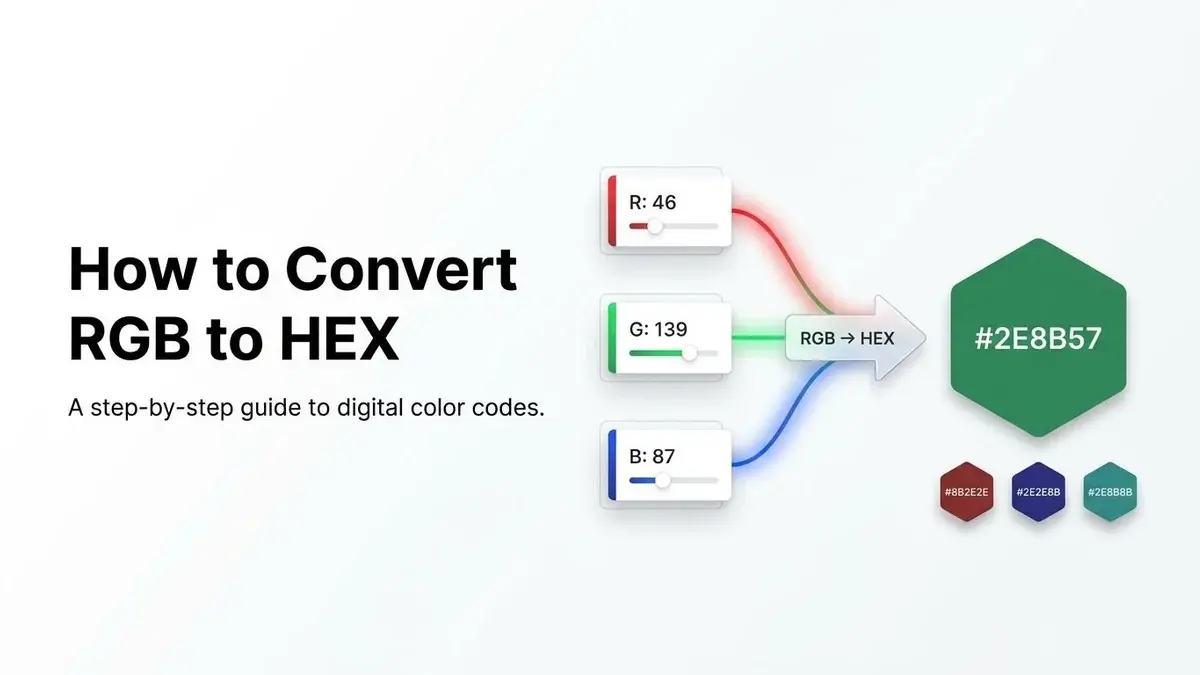
To convert RGB to HEX, convert each red, green, and blue value into a two-digit hexadecimal number, then combine the three pairs in #RRGGBB order. For example, RGB(46, 139, 87) becomes #2E8B57.
You can calculate this manually by dividing each RGB value by 16 and using the quotient and remainder to form its HEX pair. This guide explains the conversion step by step, why leading zeros matter, and how to check that your final color code is correct.
Need a result without calculating it by hand? Use the ToolsBench RGB to HEX converter.
What Are RGB and HEX Color Codes?
RGB and HEX can represent the same sRGB color using different numerical formats. Understanding their notation makes the conversion easier.
What is RGB?
RGB stands for Red, Green, and Blue. In standard 8-bit RGB notation, each channel uses a whole-number value from 0 to 255.
For example:
rgb(255, 0, 0)represents red.rgb(0, 255, 0)represents green.rgb(0, 0, 255)represents blue.
In CSS rgb() notation, the components appear in red, green, and blue order.
What is a HEX color code?
HEX uses hexadecimal, a base-16 numbering system. It uses digits 0–9 and letters A–F to represent values from 0 through 15.
| HEX digit | Decimal value |
|---|---|
| A | 10 |
| B | 11 |
| C | 12 |
| D | 13 |
| E | 14 |
| F | 15 |
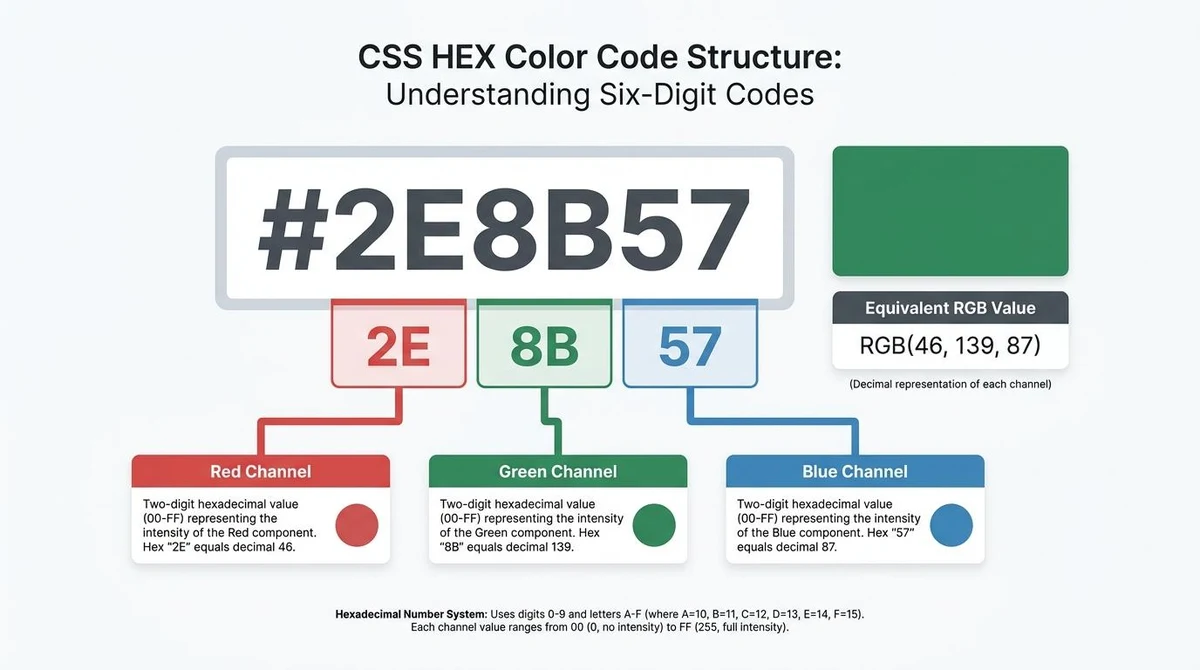
A standard six-digit HEX code follows the format #RRGGBB:
RRrepresents red.GGrepresents green.BBrepresents blue.
For example, #2E8B57 contains three pairs: 2E for red, 8B for green, and 57 for blue.
Why Does Each RGB Channel Use Two HEX Digits?
Each standard 8-bit RGB channel has 256 possible whole-number values, from 0 to 255.
One hexadecimal digit has 16 possible values. Two digits provide 16 choices for the first position and 16 for the second:
16 × 16 = 256 combinations
This is enough to represent every possible 8-bit channel value, from 00 to FF.
| Decimal value | Two-digit HEX |
|---|---|
| 0 | 00 |
| 5 | 05 |
| 10 | 0A |
| 15 | 0F |
| 16 | 10 |
| 255 | FF |
A standard six-digit HEX code uses two digits for red, two for green, and two for blue.
How to Convert RGB to HEX Manually
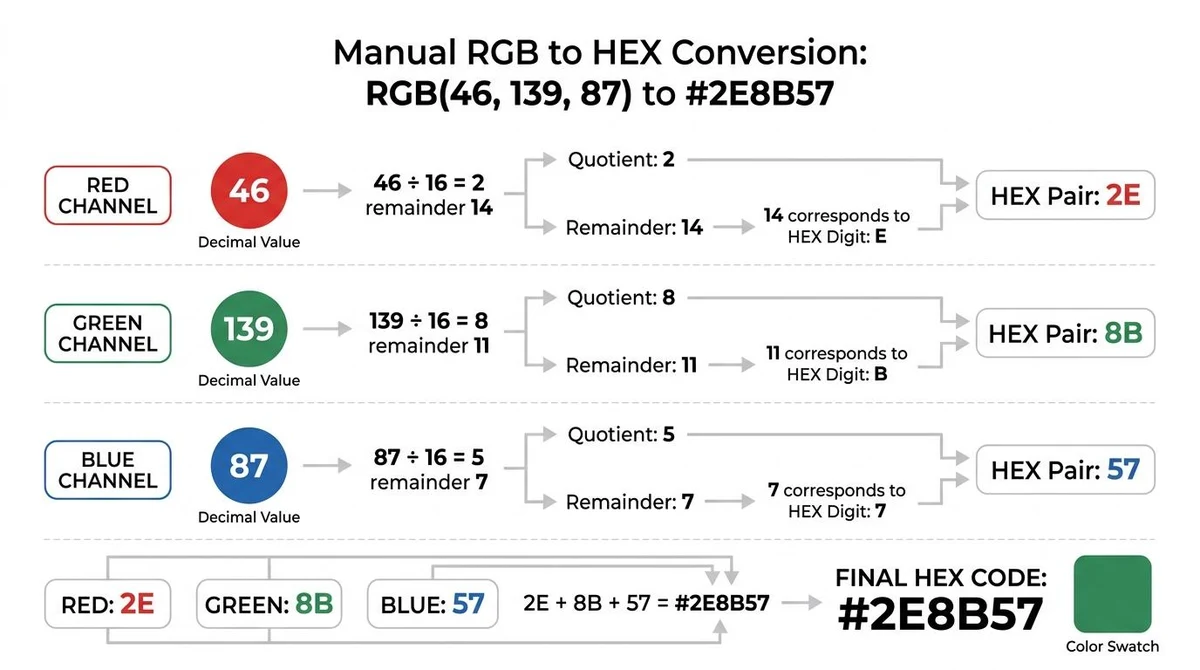
Let's convert RGB(46, 139, 87) into HEX.
You don't need to convert all three values at once. Start with red, then repeat the calculation for green and blue.
For each channel:
- Divide the decimal value by 16.
- Find the quotient, which is the whole-number result of the division.
- Find the remainder, which is left over after subtracting the quotient multiplied by 16.
- Convert values from 10 to 15 into the corresponding HEX letters A–F.
- Write the quotient's HEX digit first, followed by the remainder's HEX digit.
You can check the calculation using:
Original value = (quotient × 16) + remainder
Step 1: Convert the red value
The red channel is 46.
46 ÷ 16 = 2 remainder 14
The quotient is 2. The remainder, 14, becomes E in hexadecimal.
The red HEX pair is 2E.
Check: (2 × 16) + 14 = 46.
Step 2: Convert the green value
The green channel is 139.
139 ÷ 16 = 8 remainder 11
The quotient is 8. The remainder, 11, becomes B.
The green HEX pair is 8B.
Check: (8 × 16) + 11 = 139.
Step 3: Convert the blue value
The blue channel is 87.
87 ÷ 16 = 5 remainder 7
Both values are below 10, so no HEX letters are needed.
The blue HEX pair is 57.
Check: (5 × 16) + 7 = 87.
Step 4: Combine the three HEX pairs
Arrange the converted pairs in red, green, and blue order.
| Channel | Decimal | Quotient | Remainder | HEX pair |
|---|---|---|---|---|
| Red | 46 | 2 | 14 = E | 2E |
| Green | 139 | 8 | 11 = B | 8B |
| Blue | 87 | 5 | 7 | 57 |
Combine the pairs:
2E + 8B + 57 = #2E8B57
Final result: RGB(46, 139, 87) → #2E8B57
The method works for any three whole-number RGB channel values between 0 and 255.
Why Leading Zeros Matter
When creating a standard six-digit HEX code, each channel must contain exactly two hexadecimal digits.
If a channel converts to a single digit, add a zero before it:
- Decimal 5 becomes
05. - Decimal 10 becomes
0A. - Decimal 15 becomes
0F.
Leaving out a zero can create a different valid color instead of the one you intended.
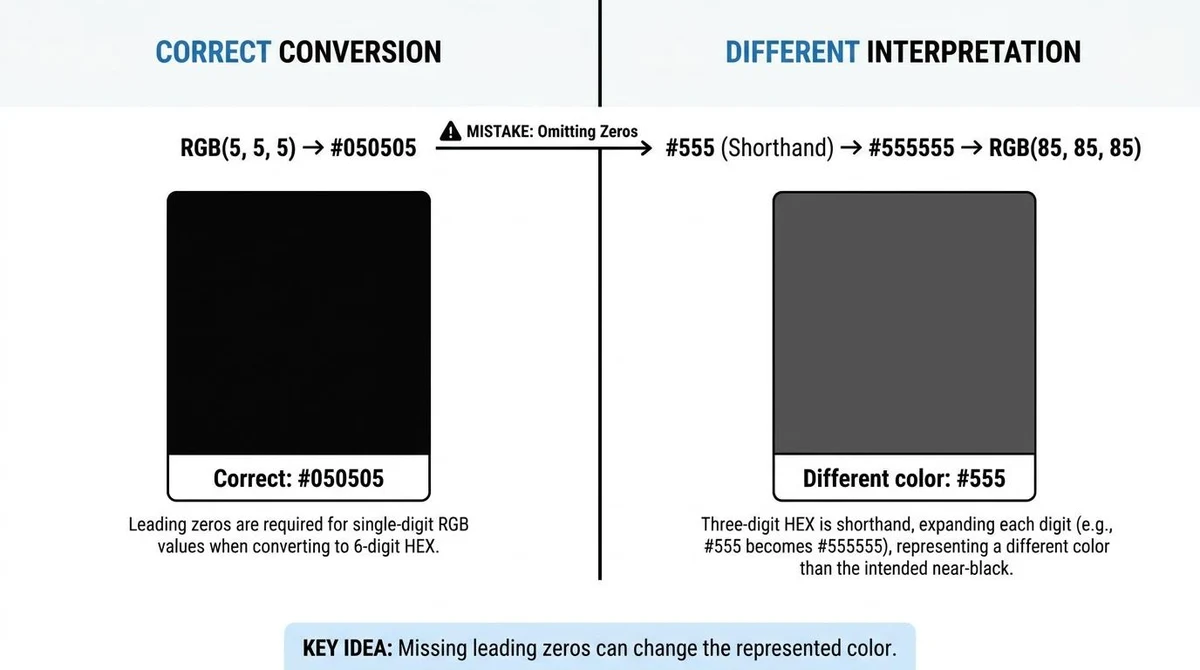
Consider RGB(5, 5, 5).
Correct result:
05 + 05 + 05 = #050505
Without the leading zeros, you might write #555.
However, #555 is valid three-digit CSS shorthand for #555555, which represents RGB(85, 85, 85). It is not the intended color.
A similar mistake occurs with RGB(255, 10, 0). The correct code is #FF0A00.
Without padding, the value could become #ffa0. CSS interprets that as a four-digit shorthand containing an alpha, or opacity, component. It expands to #FFFFAA00, not the intended opaque color.
The practical rule: Convert each channel into two digits before joining the three HEX pairs.
RGB to HEX Conversion Examples
Use these verified examples to recognize familiar colors and check your calculations.
| Color | RGB | HEX |
|---|---|---|
| Black | (0, 0, 0) | #000000 |
| White | (255, 255, 255) | #FFFFFF |
| Red | (255, 0, 0) | #FF0000 |
| Green | (0, 255, 0) | #00FF00 |
| Blue | (0, 0, 255) | #0000FF |
| Custom blue | (12, 5, 200) | #0C05C8 |
| Orange-red | (255, 87, 51) | #FF5733 |
| Gray | (128, 128, 128) | #808080 |
Notice that RGB(12, 5, 200) becomes #0C05C8. The first two channels need leading zeros, while decimal 200 becomes C8.
Every row follows the same two-digit-per-channel rule.
How to Check an RGB to HEX Conversion
You can verify a six-digit HEX code by converting each pair back into decimal.
Multiply the first hexadecimal digit's decimal value by 16, then add the second digit's value.
For #2E8B57:
- Red (2E): 2 × 16 + 14 = 46
- Green (8B): 8 × 16 + 11 = 139
- Blue (57): 5 × 16 + 7 = 87
The result is the original RGB(46, 139, 87), so the conversion checks out.
You can also check your calculation with the ToolsBench RGB to HEX converter by entering your original RGB values and comparing the output.
To work in the opposite direction, use the ToolsBench HEX to RGB converter.
Common RGB to HEX Conversion Mistakes
A few errors account for most problems when converting RGB values manually.
1. Forgetting leading zeros
Values below 16 need a leading zero when producing six-digit HEX. Decimal 5 becomes 05, not 5.
2. Reversing the quotient and remainder
Decimal 87 converts to 57, not 75. The reversed pair represents decimal 117.
3. Changing the channel order
Always combine the red pair first, green second, and blue third, following #RRGGBB.
4. Confusing HEX letters
A–F represents decimal values 10–15. For example, E means 14 and F means 15.
5. Using values outside the method's range
This method uses whole-number RGB channel values from 0 to 255. Check the input before calculating.
RGB vs HEX: What's the Difference?
RGB and six-digit HEX can represent the same sRGB color, but they use different numerical notation.
For example:
- RGB:
rgb(255, 87, 51) - HEX:
#FF5733
Both express the same red, green, and blue channel values. RGB uses decimal numbers, while HEX uses hexadecimal pairs. Neither is inherently more accurate when representing equivalent 8-bit sRGB values.
For a broader comparison, see HEX vs RGB vs HSL: Which Color Format to Use. For further technical details, see MDN's hexadecimal color documentation.
Conclusion
To convert RGB to HEX, turn each channel into a two-digit hexadecimal pair and combine the pairs in red-green-blue order.
Keep leading zeros and check the result when needed. Once you understand the method, you can calculate and verify standard RGB-to-HEX conversions yourself.
Frequently asked questions
Are uppercase and lowercase HEX codes the same?
Yes. CSS hexadecimal color codes are case-insensitive. #FF5733 and #ff5733 represent the same color.
What does the # symbol mean in a HEX code?
In CSS hexadecimal color notation, a value begins with #, followed by digits representing the color and, in some formats, its opacity.
Can every six-digit HEX code be shortened to three digits?
No. Each two-digit color pair must contain the same digit twice. For example, #AABBCC can become #ABC, but #2E8B57 cannot be shortened exactly.
Can RGB values include decimals?
Yes. Modern CSS rgb() notation supports fractional component values. This guide focuses on whole-number RGB values from 0 to 255.
Can HEX codes include transparency?
Yes. Eight-digit HEX notation uses #RRGGBBAA, where the final pair represents alpha, or opacity. For example, #FF000080 represents red with an alpha byte of 128 out of 255, or approximately 50.2% opacity.
Keep reading