Developer Tools
How to Decode a JWT Safely (Without Pasting It Into a Random Website)
A JWT is readable by anyone who has it, and while it's valid it works like a password. Here's how to read its header, payload and expiry time without sending the token to anyone's server.
- By Fayaz Ali
- 6 min read
You're debugging a login problem and need to see what's inside a token: which user it belongs to, which roles it carries, when it expires. The quickest route is to paste it into a JWT decoder website. But a JWT that hasn't expired works like a password: anyone holding it can act as that user until it runs out.
So the question isn't just how to decode a JWT, but where. The JWT Decoder on ToolsBench reads the token entirely in your browser and never sends it anywhere. Here's how to use it, how to read what comes out, and what decoding can't tell you.
What's inside a JWT
A JSON Web Token is three pieces of text joined by dots:
header.payload.signature
- Header: which algorithm signed the token, such as
HS256orRS256. - Payload: the claims, meaning facts about the user and the token, such as the user ID and the expiry time.
- Signature: proof that the header and payload haven't been changed since the token was issued.
The header and payload are JSON, encoded with Base64URL. Encoded is not encrypted. Anyone who has the token can read them, without any key. That's why a JWT should never carry secrets such as passwords, and why it matters where you paste one.
How to decode a JWT in your browser
- Open the JWT Decoder.
- Paste the token into the box. If you copied it from an
Authorizationheader, remove theBearerin front. - Read the decoded Header and Payload, which appear as you paste.
Here is a test token we made for this guide:
eyJhbGciOiJIUzI1NiIsInR5cCI6IkpXVCJ9.eyJzdWIiOiJ1c2VyXzEwNDIiLCJuYW1lIjoiU2FyYSBLaGFuIiwicm9sZSI6ImVkaXRvciIsImlhdCI6MTc5MzQzMzYwMCwiZXhwIjoxNzkzNDM3MjAwfQ.xR2BcHZEtL1CELdOmjoTbNeAjsam4m7_dbcmfexcgqU
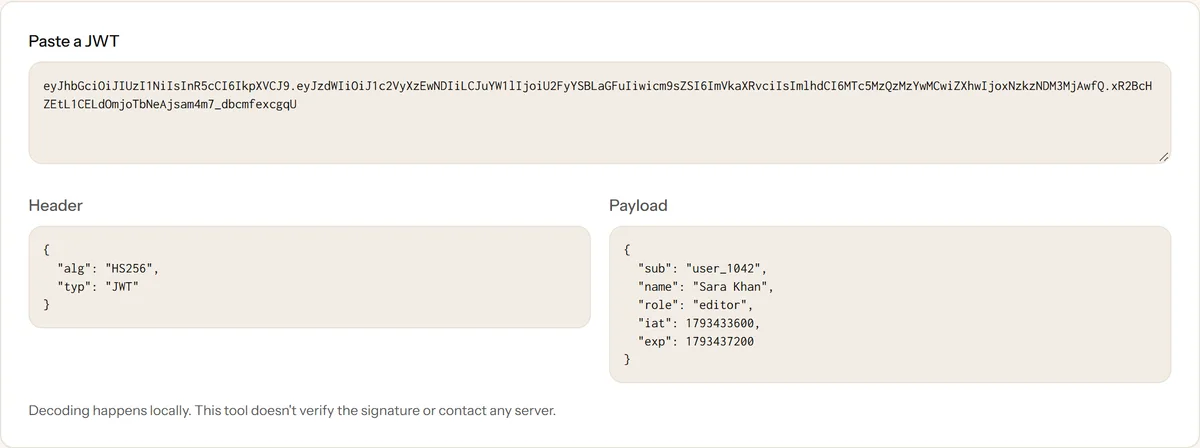
We checked what the page sends while decoding, on October 31, 2026: pasting and decoding the token made no network requests at all, and the token appeared in no request.
Reading exp, iat and nbf
Three claims are about time, and they are written as Unix timestamps: seconds since January 1, 1970, UTC.
| Claim | Meaning |
|---|---|
iat |
Issued at: when the token was created |
exp |
Expires: after this moment the token must be rejected |
nbf |
Not before: the token isn't valid until this moment |
The decoder shows them as raw numbers. To turn one into a date, paste it into the Timestamp Converter. In the test token, iat is 1793433600, which is October 31, 2026 at 08:00 UTC, and exp is 1793437200, exactly 3,600 seconds (one hour) later.
A login that fails right after it worked is often an expired token. Compare exp with the current time, which the Timestamp Converter shows at the top, and remember both are in UTC.
Decoding is not verifying
This is the mistake that causes real security bugs. Decoding a JWT tells you what it says. It doesn't tell you whether it's true.
Anyone can create a token that claims "role": "admin". What stops it working is the signature: the server checks it with its secret key (for HS256) or a public key (for RS256), and rejects the token if the header or payload was changed. The JWT Decoder doesn't verify signatures, and no decoder can without your key.
So in your own code:
- Verify on the server with a maintained JWT library, and only then trust the claims.
- Fix the allowed algorithms in your verification settings, rather than accepting whatever the token's header says.
- Never make access decisions from a decoded payload in front-end code alone.
Safer habits with tokens
- Prefer expired or test tokens when you're only checking the structure.
- Treat a live production token like a password. Paste it only into tools that run in your browser, and confirm that with the Network tab: press F12, open Network, decode the token and check that no request carries it.
- Don't post tokens in tickets, chat messages or screenshots. If one leaks, revoke it or wait for it to expire.
- For a quick look without any website, the browser console works too. Paste this, with your token in place of
TOKEN:
JSON.parse(atob("TOKEN".split(".")[1].replace(/-/g, "+").replace(/_/g, "/")))
It prints the payload. Like the decoder, it doesn't verify anything.
When a token won't decode
"A JWT has three dot-separated parts". The text you pasted doesn't contain the dots, usually because it was cut off when copying.
"Couldn't decode this token". Check for a leftover Bearer prefix or stray spaces. If the token has five parts instead of three, it's an encrypted JWT (JWE), and its contents can't be read without the decryption key.
The payload is unreadable JSON. Make sure you copied the whole token. If the JSON is long, paste the payload into the JSON Formatter to lay it out clearly; our guide on why JSON formatting matters shows what to look for.
Decode your token now
Decode a JWT in your browser, then convert its exp with the Timestamp Converter. The token never leaves your device.
Frequently asked questions
Is it safe to decode a JWT online?
Only if the tool decodes it in your browser. A valid token works like a password until it expires, so pasting it into a site that sends it to a server means trusting that server. ToolsBench's JWT Decoder runs locally, and you can confirm that in your browser's Network tab.
Can you decode a JWT without the secret key?
Yes. The header and payload of a normal signed JWT are only Base64URL-encoded, not encrypted, so anyone can read them. The secret or public key is needed to verify the signature, not to read the contents.
Does decoding a JWT check that it's valid?
No. Decoding only reads the contents. Checking that the token is genuine and unchanged means verifying the signature with the right key, which your server should do with a JWT library.
What format are exp and iat in?
They are Unix timestamps in seconds: the number of seconds since January 1, 1970, UTC. Paste the number into a timestamp converter to see the date.
Why does my token fail to decode?
The most common causes are a leftover "Bearer " prefix, a token cut off when copying, or an encrypted token (JWE) with five parts instead of three, whose payload can't be read without the key.
Keep reading
More on Developer Tools
 Developer Tools
CSV vs JSON: How to Choose the Right Data Format
CSV and JSON are both everywhere, but they suit different data. See their strengths, pitfalls and a simple way to pick the right one for the job.
6 min read
 Developer Tools
Why Properly Formatted JSON Matters
Trailing commas, single quotes and missing brackets break JSON silently. Learn the common mistakes and how to catch them before they hit production.
5 min read